A prepaid electricity meter lets you manage your own power usage: buy a token, enter the code, and the electricity is ready to use. The problem is that many people only panic once the meter starts beeping to signal that the balance is almost gone, often at night. The good news is that electricity tokens can now be bought online from home in just a few minutes. This article covers how to buy a token, how to enter the code into the meter, how to check your remaining kWh, and why the kWh you receive does not exactly match the rupiah you paid.
Meter number vs customer ID: what is the difference?
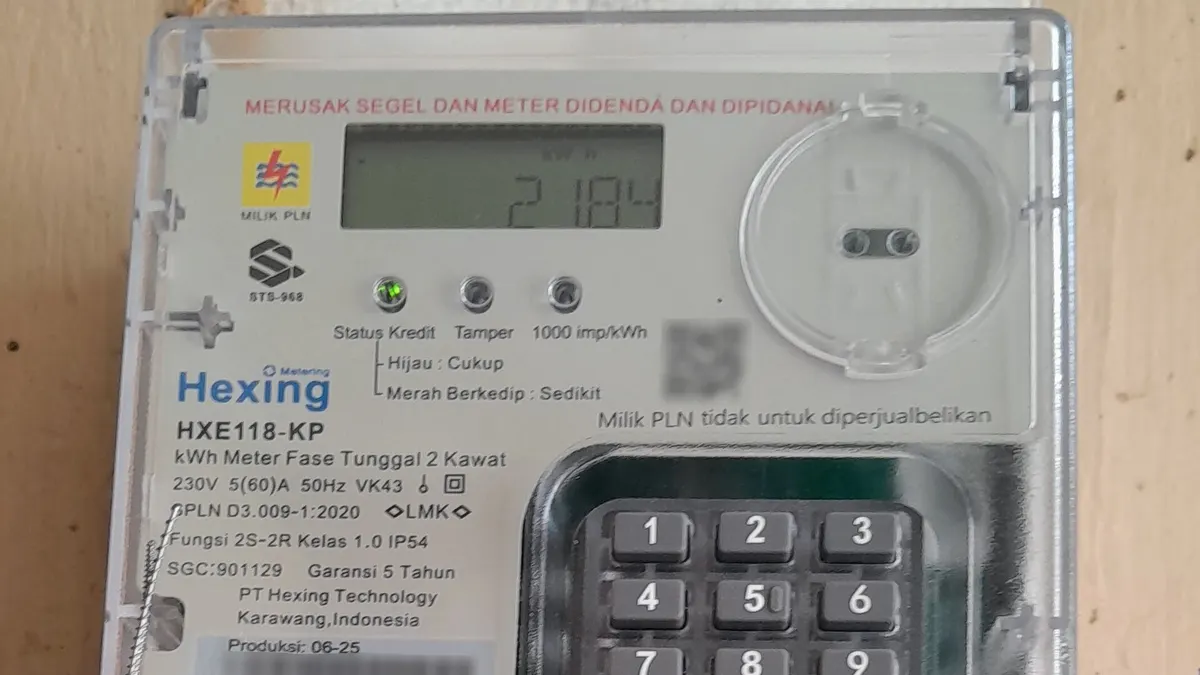
Prepaid electricity customers of PLN (Indonesia's state electricity company) have two identification numbers that are often mixed up. The meter number is printed on the body of the meter, usually on the front near the display or keypad. The customer ID is your customer number in the PLN system and appears on previous token receipts. To buy a token, either number can generally be used, since both refer to the same meter.
The most important thing is accuracy. A token code is generated specifically for one particular meter. If you mistype a single digit and that number happens to belong to someone else, the token you buy will go to that person's meter, not to your home. Save your meter number or customer ID in a note on your phone so you do not have to type it from memory.
How to buy an electricity token on Anakjuragan
- Make sure your Anakjuragan account balance is sufficient. If it is not, top up first on the /topup page.
- Open the /produk-digital page and choose the Token PLN service, or go straight to /produk-digital/transaksi/token-pln.
- Type your prepaid meter number or customer ID in the Customer ID field, then double-check every digit.
- Choose the token amount you need. The current price list can also be viewed on the /daftar-harga page.
- Read the summary on the confirmation screen. If the number and amount are correct, proceed to pay with your account balance.
- The transaction is processed automatically. Once it succeeds, you can see the 20-digit token code in Digital History on the /riwayat/digital page.
If a transaction fails, your money is returned to your account balance so it can be used for your next transaction. The status of every purchase, whether successful, in progress, or failed, can always be monitored in Digital History.
Token PLN at AnakjuraganProcessed automatically with a confirmation step; status saved in Digital History. Buy nowHow to enter the 20-digit token code into the meter
A prepaid electricity token code consists of 20 digits. The way to enter it is generally the same on almost all meters, although the display and buttons may differ slightly depending on the brand.
- Make sure the meter display is on. A meter whose balance has run out can still accept a new token code.
- Type the 20-digit token code on the meter keypad in order. If you make a typo, use the delete key provided on the meter.
- Press the Enter key or the confirmation key as marked on the meter.
- Wait until the display shows that the token has been accepted, then check whether your kWh balance has increased.
If the meter rejects the code, do not immediately buy a new token. Check again whether any digit was skipped or swapped, then try again. Also make sure the token was actually bought for the correct meter number by checking the details in Digital History.
How to check your remaining kWh on the meter
On many meters, the remaining kWh is shown directly on the display under normal conditions. Some meters also have a specific button or numeric code to show information such as remaining kWh, usage, or the meter number. Because these codes vary between brands, it is best to check the manual or the instruction sticker on your meter. Make a habit of checking your remaining kWh regularly so you can buy a token before the meter starts beeping to warn of a low balance.
Why doesn't the kWh you get match the rupiah amount?
This is the most frequently asked question. Electricity tokens are different from phone credit. Not all of the rupiah you pay is converted into electrical energy. In general, several components are taken into account:
- Street Lighting Tax (PPJ), a regional tax whose rate is set by each local government, so it can differ between regions.
- Administration fees from the purchase channel you use.
- For high-value purchases, there may be other components such as stamp duty in accordance with applicable regulations.
- The remaining amount is then converted into kWh based on the electricity tariff per kWh for your power class.
That is why two homes buying tokens of the same amount can receive different amounts of kWh, for example because their power class or region differs. The breakdown of each purchase is usually listed on the receipt or token details.
Tips to avoid a sudden power cut
- Buy a token while your remaining kWh still covers a few days, rather than waiting until it runs out.
- Save your meter number or customer ID correctly and double-check it before confirming.
- Enter the token code right after the transaction succeeds so you do not forget or lose it.
- Use Digital History to look up the token code again if you did not save the receipt.
With these simple habits, buying electricity tokens on Anakjuragan can become a quick routine that is no longer a hassle.
FAQ
Can I buy an electricity token using the meter number?
Generally you can use either the meter number or the prepaid customer ID, since both refer to the same meter. Make sure every digit is correct before confirming.
Where can I see the token code after buying on Anakjuragan?
The token code can be viewed in Digital History on the /riwayat/digital page once the transaction has succeeded.
What happens if a token transaction fails?
A failed transaction does not permanently deduct your balance. The money is returned to your Anakjuragan account balance.